From 8 to 3mins: Streamlining Ad-Hoc Invoicing for 2,000+ SaaS Businesses
Role
Lead Designer
Researcher
Engineering Hand-off
Team
+ Myself
+ Product Manager
+ Engineer
Timeline
12 weeks (2024)
Outcomes
60% faster invoice creation time
Average time reduced from 8 minutes to 3 minutes per invoice
55% reduction in support tickets
Users could now complete tasks independently without contacting support
2,000+ businesses impacted
Enabled faster revenue collection on the platform
Improved satisfaction and retention
Reduced churn attributed to billing workflow frustrations
"Definitely makes my life easier being able to add all the catalog items from the dropdown; it was quick and very efficient."
Barrow M. —VP of Product
To protect confidential information, I have removed or modified any sensitive details in accordance with my confidentiality agreement.
Problem
The ad-hoc invoicing feature needed an overhaul
Support tickets were piling up. Finance teams across our customer base were frustrated with ad-hoc invoicing—a feature that should make their lives easier was actually slowing them down. Core issues:
Flooding support: Tickets about ad-hoc invoicing limitations kept piling up
100% manual entry: Every product name, quantity, price, and coupon calculated from scratch
7-8 min per invoice: Hours lost weekly for high-volume billing teams
Feature gaps: No catalog selection, coupons, tax visibility, or line item editing
Research
We knew that users struggled
Support tickets flagged a problem, but we wanted to dig deeper. I wanted to understand how users currently used ad-hoc invoicing, identify pain points and workarounds, and validate our assumptions about primary use cases.
I partnered with Sales and Marketing to recruit 8 participants spanning early-stage startups, SMBs, and enterprise customers for 45-minute interviews:
3 Billing Operations
2 Customer Exerpience
3 Finance / AR Managers
Our initial assumption was that users primarily needed ad-hoc invoicing for one-off charges. The research revealed something completely different.
Finding #1: Re-issuing invoices was the primary use case
7 out of 8 participants used ad-hoc invoicing to re-issue invoices rather than create one-off charges. Common scenarios included:
Incorrect invoice details
Voided invoices
Dunning processes
Cancellations
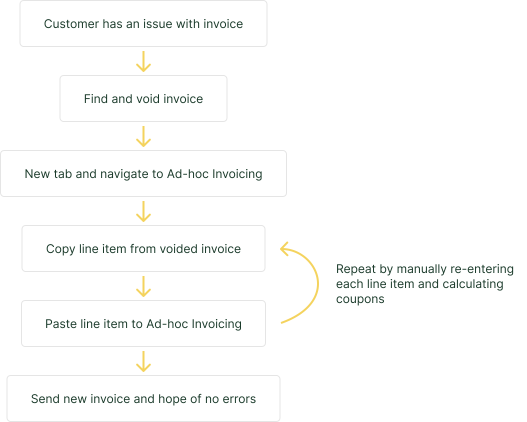
Finding #2: Manual workarounds created massive inefficency
Users had developed painful workarounds just to re-issue invoices:
Open the voided invoice
Manually copy each line item
Paste details into ad-hoc invoicing page
Re-enter all information from scratch
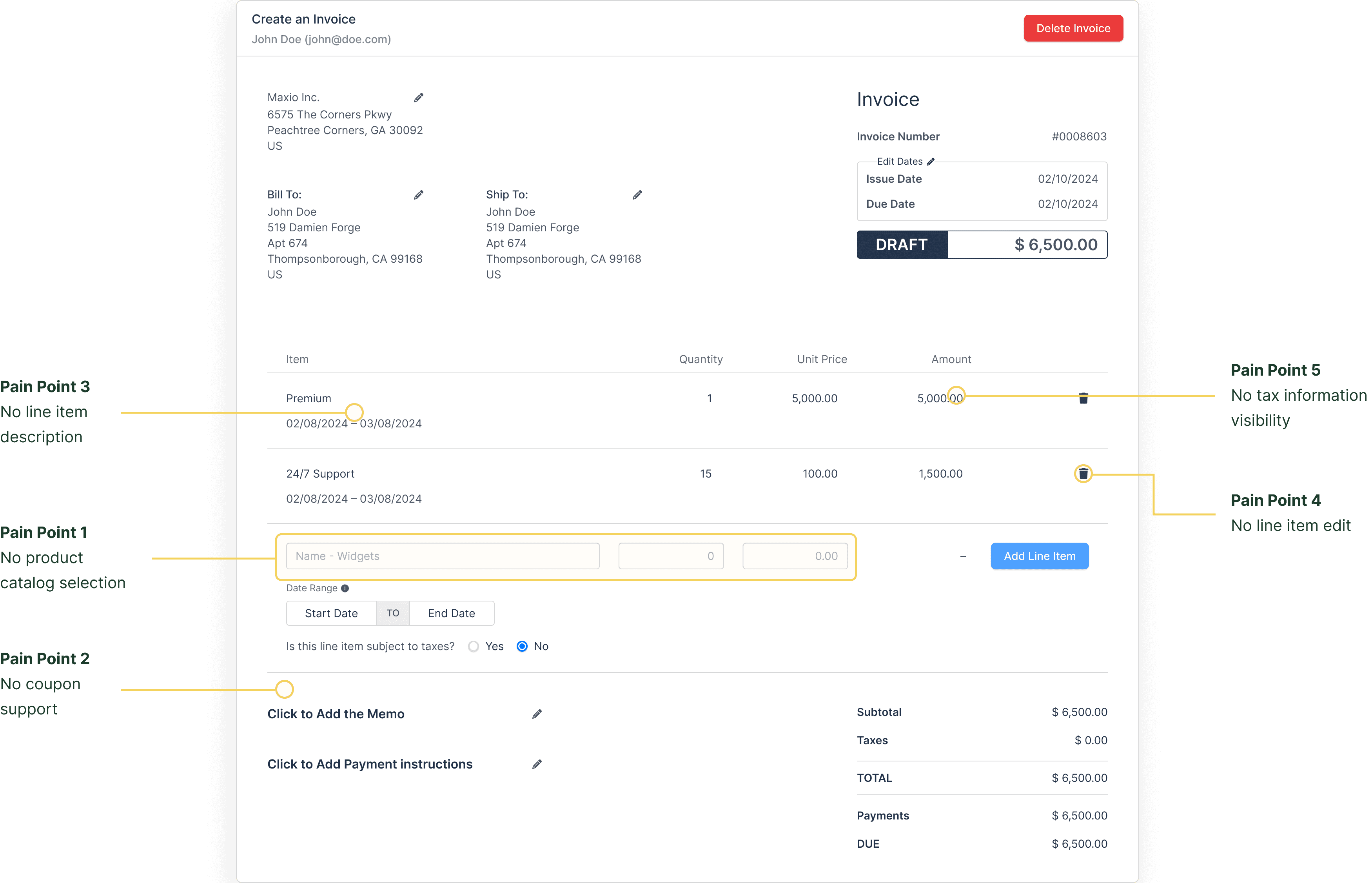
Finding #3: Five critical pain points emerged
No product catalog selection
"There's no dropdown feature for existing products, which is very odd to me. It is limiting that you can't use a dropdown to select products on the ad-hoc invoice creator."
—Kris, Billing Manager
No coupon support
"If I have discounts or coupons, I have to calculate those on my own, and then the line item price as well."
—Andrea, Finance Manager
No tax information visibility
"When adding line items, it won't show what tax the product has. Nothing indicates which line items are taxed."
—Greg, CS Manager
No line item editing
"When you're adding a line item and entered the wrong quantity, you have to delete the whole line item and start over."
—Sally, AR Manager
No tax information visibility
"There are instances where we need to put description per line item, but we can't."
—June, AR Manager
Competitive Analysis
Dropdown selection was an industry standard
I analyzed how leading subscription billing platforms handled ad-hoc invoicing to understand industry patterns and identify opportunities:
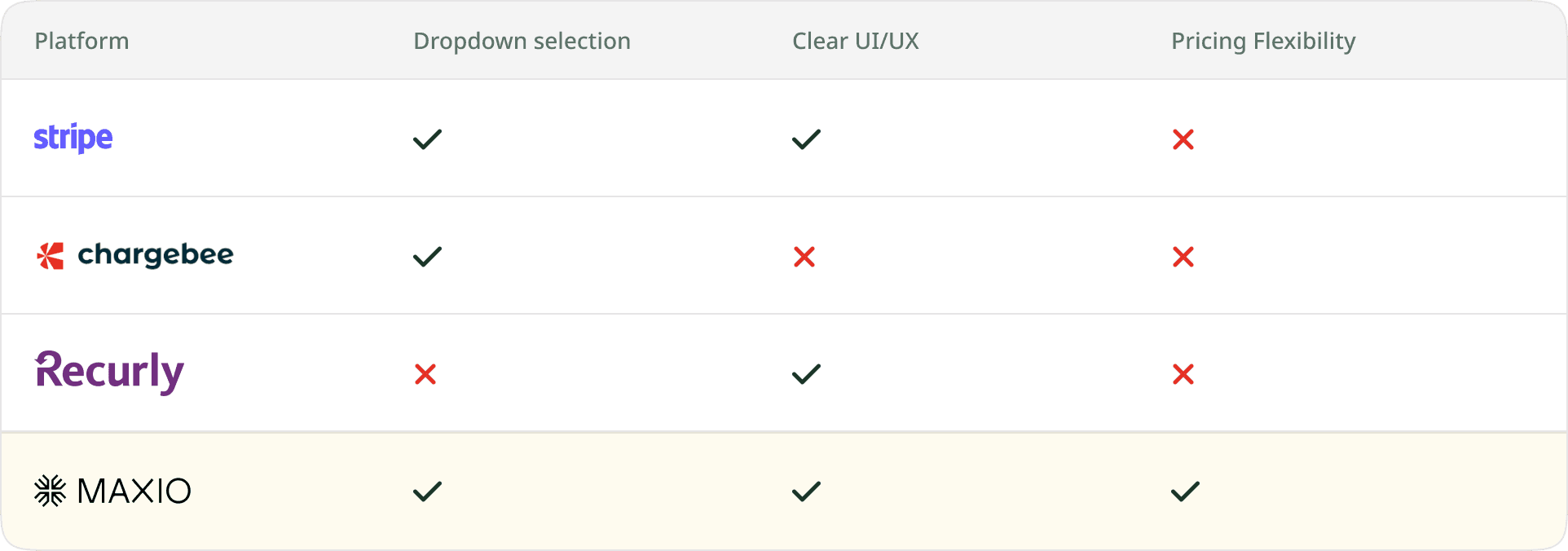
All major platforms offered catalog selection via dropdown
This validated that product selection was an industry-standard pattern users would expect. The opportunity was to implement it more clearly than Chargebee while maintaining flexibility beyond Recurly's simple approach.
Early Concepts
Exploring the dropdown
One of the core challenges was deciding how to present the product catalog within the dropdown. I explored four different approaches before landing on the final solution.
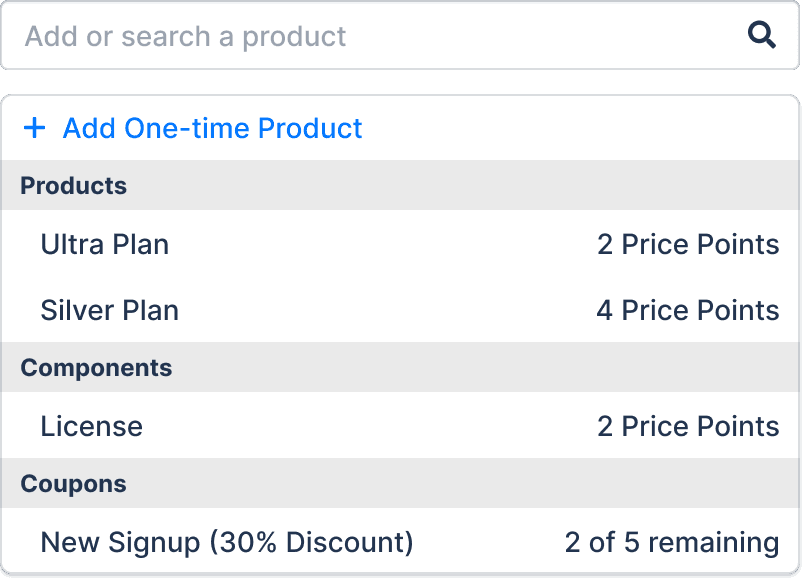
Concept 1: Three Entry Points
Gave users three ways to add a line item: one-time product, select from catalog, or search. Flexible, but introduced unnecessary decision-making before users could even start.
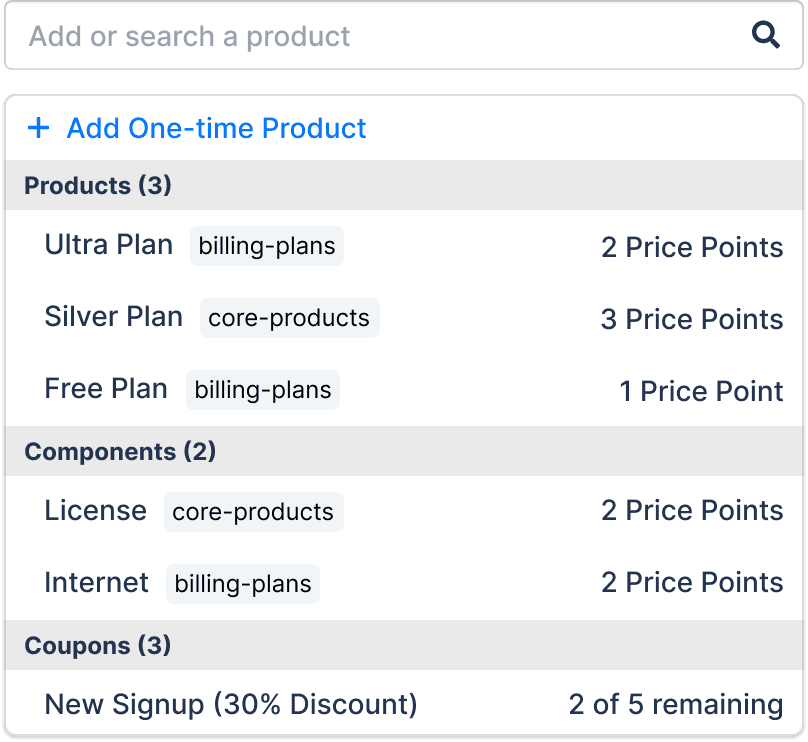
Concept 2: Show Full Subscription Contents
Surfaced all products and components from the user's existing subscription. Quickly ran into an edge case—customers with 50+ products in a family made this overwhelming fast.
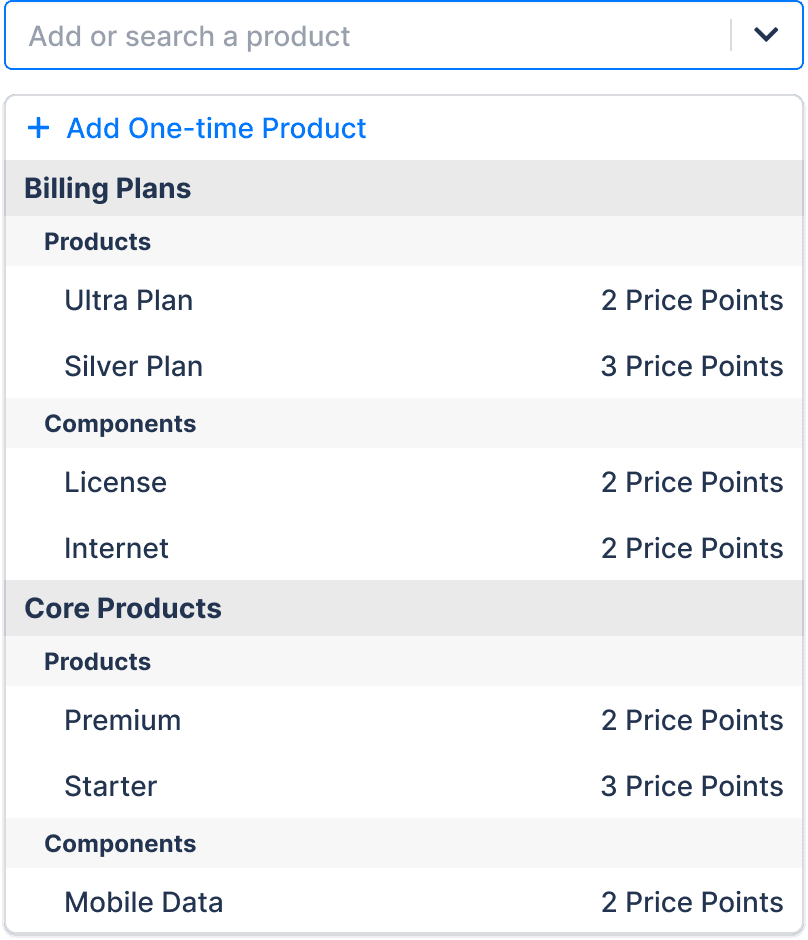
Concept 3: Organize by Product Family
Grouped items by product family for a more structured experience. Still presented too much information upfront for customers with large, complex catalogs.
Concept 1
Concept 2
Concept 3
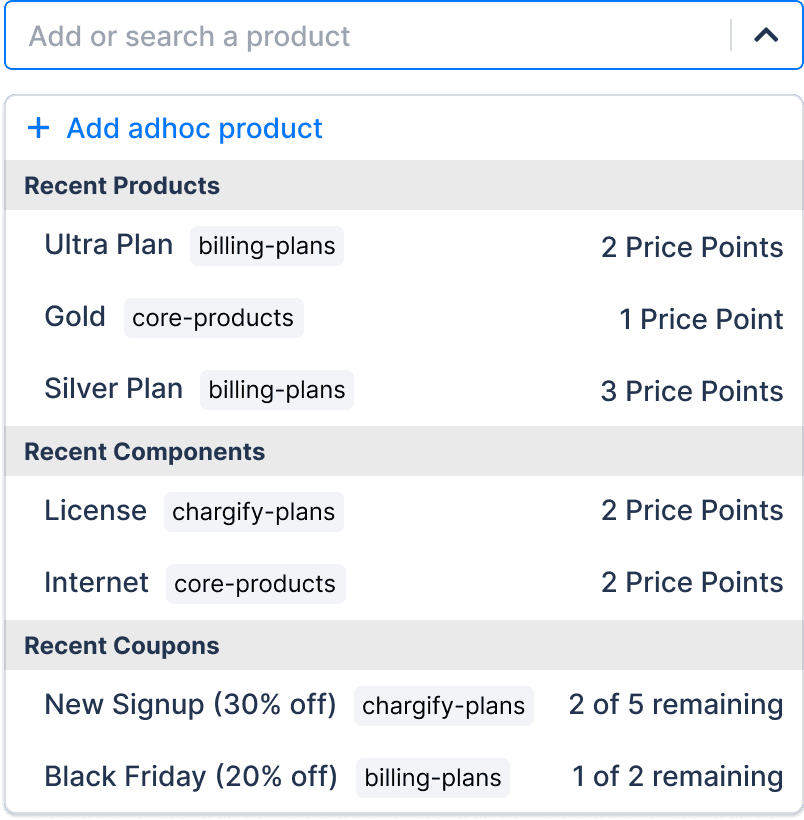
Final: Most Recent
Working with PM, engineer, and UX manager, we aligned on showing only the most recently used products scoped to the user's subscription. Relevant, lightweight, and handles large catalogs gracefully.
Rethinking Coupon Behavior
Coupons turned out to be the most complex design challenge of the project. My initial approach made sense visually, but it completely overlooked how coupons actually behave in a billing system.
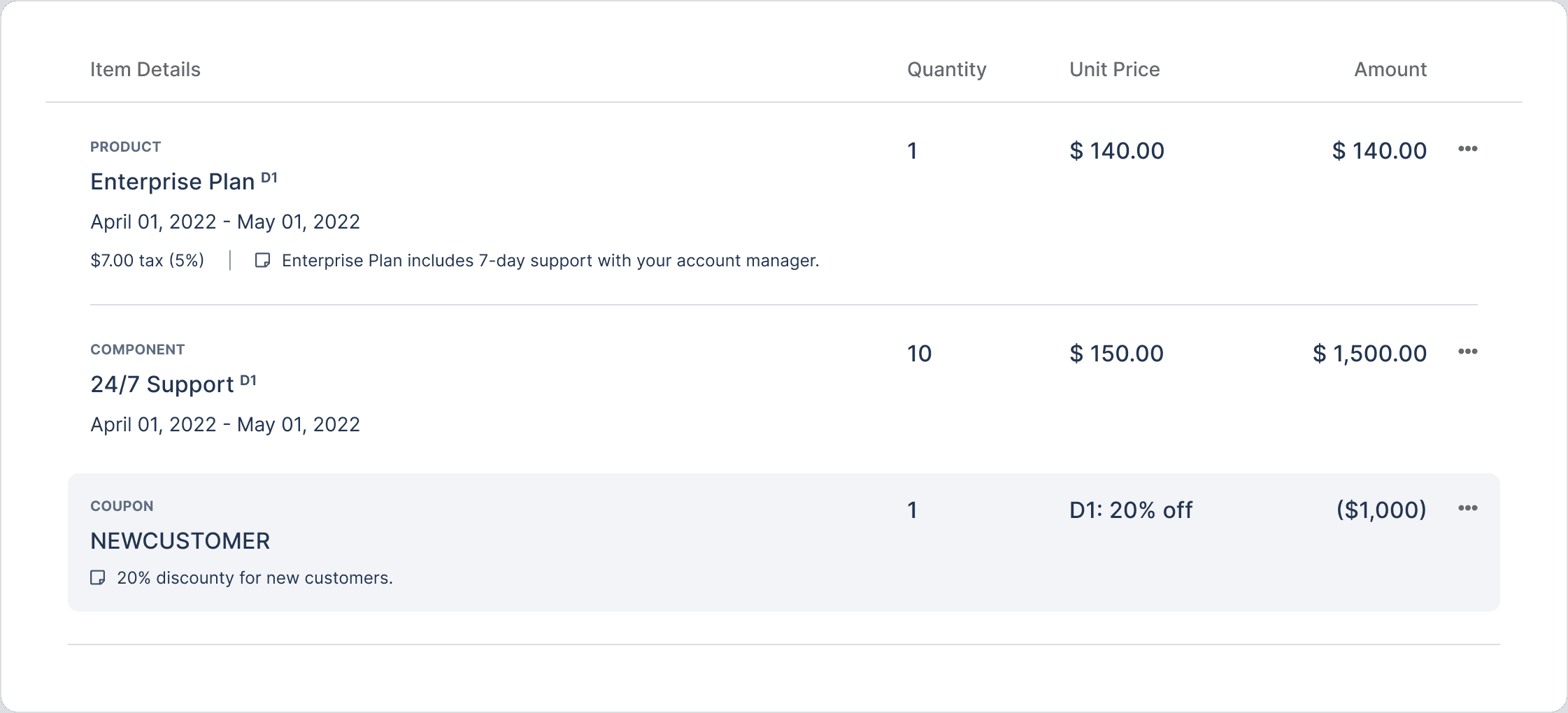
Initial Concept: Coupons as Line Items
My first instinct was to treat coupons like line items—negative amounts mixed in with products. It seemed logical and kept everything in one place.
The Problem
In design critique, the team flagged a critical issue. Coupons aren't simple discounts—they have complex behaviors: compounding logic and product-level restrictions.
A coupon can apply to specific line items, not the entire invoice. Mixing them with products would confuse users and make the calculation logic nearly impossible to follow.
Final Design: Separate Coupon Section
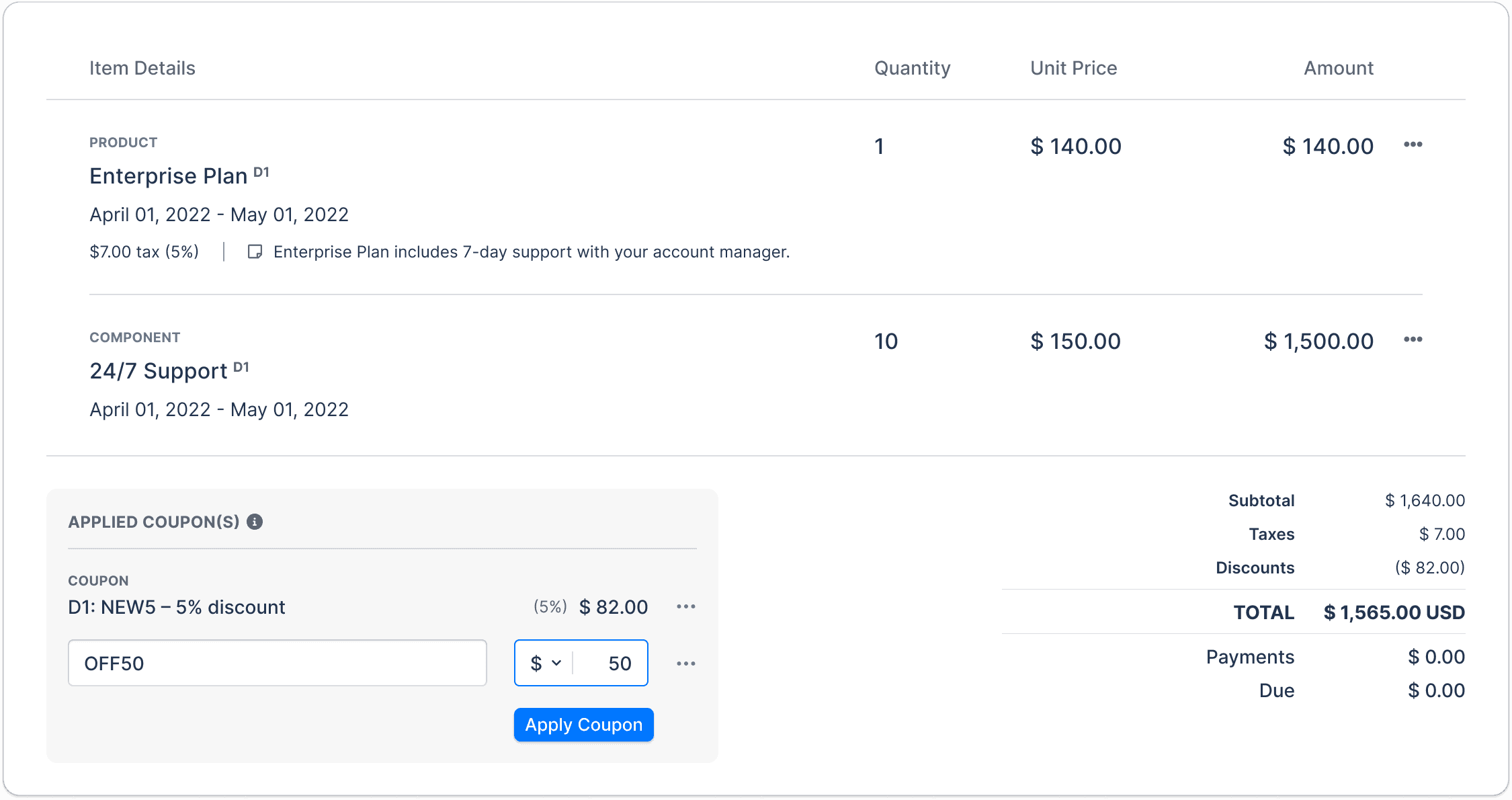
I redesigned coupons as their own dedicated section with a separate dropdown. Users can select existing coupons or create an ad-hoc coupon, with advanced options to handle different coupon behaviors. Separating them from line items made the logic clear and the interface far more intuitive.
This was a great reminder that collaboration catches what solo design misses—what seemed obvious to me had significant technical and UX implications I hadn't considered.
Progressive Disclosure
Reducing Cognitive Load
One of my key design principles for this project was to keep the interface clean and focused. I applied progressive disclosure throughout the line item experience—only surfacing fields and options when users actually need them.
State 1: Empty Row
By default, users see a minimal row. No overwhelming fields, no decisions to make yet.

State 2: Product Selected
Once a product is selected from the dropdown, quantity, unit price, and amount fields appear. Optional actions—"Add tax" and "Add description"—are available but tucked away.
State 3: Tax + Description Expanded
When users opt in, tax automatically calculates based on the product's tax type, quantity, and unit price. A hover prompt guides users who try to add tax before filling in required fields first.
This approach kept the initial experience lightweight while making advanced options easily accessible—meeting users where they are without overwhelming them upfront.
Coupons
How Coupons Work in the Redesign
Coupons live in their own dedicated section, separate from line items. This keeps the invoice clear and the discount logic transparent.
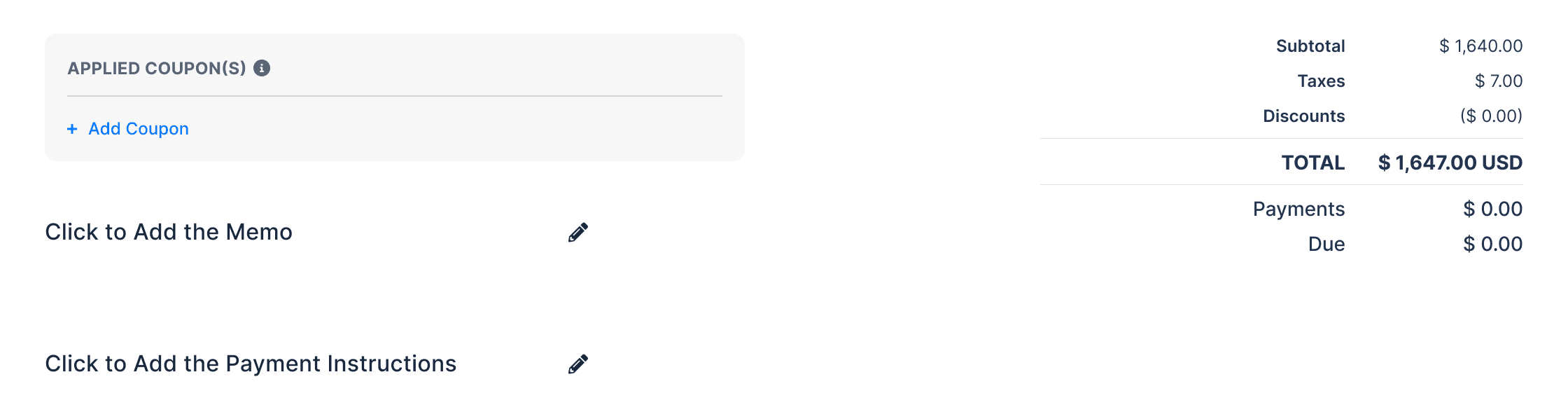
State 1: Add Coupon
A simple "Add Coupon" link sits below the line items—unobtrusive until needed.
State 2: Coupon Dropdown Open
Clicking it opens a dropdown showing recent coupons for quick selection, a search field for larger catalogs, and an option to create an ad-hoc coupon on the spot.
State 3: Advanced Options
Once a coupon is selected, advanced options expand—allowing users to add a coupon description, set ordering and compounding behavior, and apply product restrictions. Power users get full control without cluttering the default experience.
Separating coupons from line items wasn't just a visual decision—it reflected how coupons actually behave in the billing system. Clarity in the UI meant clarity in the math.
Testing
Validating with Usability Testing
Before handing off to engineering, I wanted to validate the designs with real task-based scenarios. Due to timeline constraints, I tested with 6 internal participants who matched our target user profiles using a think-aloud method.
Tasks covered:
Re-issuing invoices
Creating one-off invoices
Applying coupons
Re-issuing invoices felt fast and intuitive
Participants completed re-issuing tasks quickly—a direct validation that the dropdown and pre-populated pricing solved the core pain point.
Coupon section landed well
Participants understood the separate coupon section without guidance, validating our decision to keep coupons distinct from line items.
Naming conventions needed refinement
Some field labels caused confusion. We iterated on the prototype to clarify naming before engineering handoff.
Impact
3 months after launch…
Three months after launch, the results spoke for themselves—but the numbers only tell part of the story.
🕐
Faster Workflows
Billing workflow frustrations were a known churn driver. The redesign removed that friction entirely.
🎫
Fewer Support Tickets
Monthly tickets fell from ~150 to ~45. The support team was freed up to focus on higher-value customer issues.
📉
Reduced Churn
Billing workflow frustrations were a known churn driver. The redesign removed that friction entirely.
🤝
Unblocked Enterprise Deals
Feature limitations were stalling enterprise sales conversations. This removed a key objection at the deal table.
⚡
Faster Revenue Collection
Streamlined invoicing meant customers could bill faster—directly impacting their cash flow.
🏆
Stronger Market Position
Closed the feature gap against Stripe, Chargebee, and Recurly—making Maxio more competitive in the market.
Looking Back
What I Learned
Never Skip Research
Assumptions almost took us in the wrong direction. Research revealed users were re-issuing invoices—not creating one-off charges like we assumed.
Small Changes, Big Impact
Dropdowns, pre-populated pricing, inline editing—simple patterns that matched real workflows and drove measurable results.
Collaborate Early and Often
Engineering caught coupon complexity I would have missed alone. Diverse perspectives lead to better solutions.
What I'd Do Differently
Test With Real Customers
Internal testing validated our approach, but real customers would have surfaced edge cases we didn't anticipate.
Deep-Dive Complex Features in Discovery
I learned about coupon complexity mid-design. Earlier research would have shaped my designs sooner and saved iteration time.
Explore More Alternatives
We landed on a good solution for coupons, but I could have explored more patterns before committing to a direction.
NEXT CASE STUDY
Reimagining Maxio’s subscription management in HubSpot
40% faster setup time and 65% fewer support tickets— streamlining subscription management for sales teams.
FinTech
design lead
UX Research